KarAll

Advanced Midi Karaoke MP3 multi player


Index General Player Midi Out DB/Explorer Karaoke Chords finder Audio-Video Rec ShortCuts ScreenShots

DataBase

DataBases management in MS-Access format. DB-Engine interface it's completely automatized but, if you want, it's possible to manage structure, add functionality (i.e. Printer reports) without change of primary DB structure.

DataBases functions

DB rows functions

How you can create a DB quickly ?
Look at "Support-Tips" section

bulletNew
Create new DB
bulletOpen
Open DB thar already exists
bulletClose
Close DB in use
bulletSelect
Select from DB using requested criteria and sort. You can use SQL language and save selection as "Query" to recall it next time.
bulletScan/Import
Hard-disk scan to search and import in DB multimedia files.
bulletQuery maintenance
Manage registered "Queryies" (delete, rename)
bulletRepair/Compact database
bulletModify DB
Active/Deactive modify mode on DB.
bullet Search lyrics/errors on midi files
Find on midi in Database files that contains lyric and/or errors. 
bullet Search duplicates midi files
Search forduplicates  midi in Database. 
bullet Songs report
Print songs report from DB selecting and/or ordering on used "Query".
bulletPrint preview of songs report
Display a print preview of songs report. Require MS Office©
bulletNormalize Name/Author
("G" shortcut)

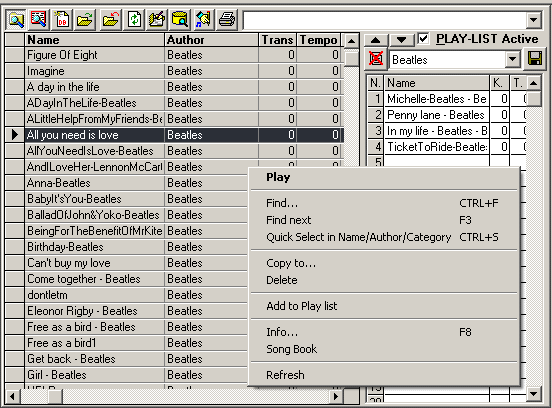
Functions can be activated using right button of mouse

bullet

*Play
Play selected song

bullet

*Find
Find text in DB rows (Title, Author, etc.)

bullet

*Find next
Find next element

bullet

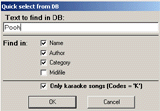
*Quick Select
Select songs from DB for requested string
bullet

Copy to
Copy current file in selected directory

bullet

Delete
Delete current row in DB and relative file

bullet

*Add to play list
Add current song to Play-List

bullet

*Info
Information on current song (Midi format, N.tracks, Text & Lyrics)

bullet

Song Book
To view and printingl Song Book

bullet

Refresh
Window refresh

Music Explorer

Directories Functions

Files list Functions

bulletNew folder
Create new directory
bulletRename
Rename selected directory
bulletDelete
Delete selected directory (move to "Trash" folder)
bulletFind
Active Windows find function from current folder
bulletRefresh
Window refresh

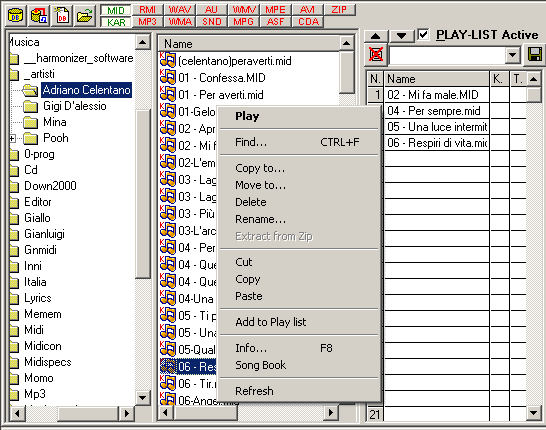
Functions can be activated using right button of mouse

bullet

*Play
Play current song

bullet

Find
Active Windows find function from current folder
Copy to
Copy selected files to...

bullet

Move to
Move selected files to...

bulletDelete
Delete select files (move to "Trash" folder)
bulletRename
Rename current file
bullet

Extract from Zip
Extract contained files in ZIP file into current folder

bullet

Cut, Copy, Paste
Organize files and folders

bullet

Add to Database
Add selected files to DB

bullet

*Add to play list
Add selected files to Play-List

bullet

*Info
Information on current song (Midi format, N.tracks, Text & Lyrics)

bullet

Song Book
To view and printing Song Book

bullet

Refresh
Window refresh

Play-List management

bullet

Play-List active
Active/Deactive play-list

bullet

Move song
Up/Down

bullet

Clear play-list
To delete all songs from PL

bullet

Save play-list

bullet

Load play-list

bullet

Del (Keyboard)
Delete current song in Play-List

bullet

ShortCut (Keyboard) "K-k"
Increase/Decrease key of current song

bullet

ShortCut (Tasto) "T-t"
Increase/Decrease "Tempo" of current song

(*) ShortCuts activated

Index General Player Midi Out DB/Explorer Karaoke Chords finder Audio-Video Rec ShortCuts ScreenShots

KarAll

KarAll © 2000-2008 by KarMidi ®  Version on-line: 1.18.0
Last update:24-06-2008
The quoted marks are of the respective owners. 
info@karmidi.com